目次
はじめに
おはようございますからこんばんわまで。ギークフィードのaraoです。
Amazon Connect アドベントカレンダー 2025 10日目のブログです。
AWS re:Invent 2025でAmazon Bedrock AgentCoreのアップデートがいっぱいありましたね。
今回は、Amazon ConnectとAmazon Bedrock AgentCoreを組み合わせることで、 Amazon Bedrock Knowledge Basesと連携したチャットボットを構築してみました。
本記事では、Amazon ConnectのCreateParticipant APIを使用してLambdaをチャットの会話に参加させることで、Amazon Lexを利用せずにチャットボットを構築します。
最初に結論
世の中に記事がなかったので実装してみましたが、今回の実装だと使い勝手があまり良くない点と制約事項が多い点から本番環境での提供は難しいかなというのが正直な印象です。
ブラッシュアップしていないこともあり、Amazon ConnectのチャットとAmazon Bedrock AgentCoreの連携が必須という要件以外は、Streamlitなどを使って別でGUIを提供するほうがいいと所感です。
制約事項
制約事項は以下です。
1. Custom Participant切断の制約
チャットの会話にAmazon Lexやエージェントが入るとCustom Participantは切断されます。
2. Custom Participantは1つのみ
1つのコンタクトにおいてCustom Participantは1つまでです。複数の用途のチャットボットを使いたい場合、Amazon Bedrock AgentCore側で実装する必要があります。
3. プロンプト再生ブロックが必須
CreateParticipant APIを利用するLambdaの処理の前に、Amazon Connectの「プロンプトの再生」ブロックを設定する必要があります。そのため、チャットの開始時にプロンプトとLambdaによるプロンプトの2つが投稿されます。
4. 添付ファイル非対応
CreateParticipant APIでは添付ファイルを参照できません。
5. 一次応答が必須
Amazon Connectのコールフロー内Lambdaは最大8秒のタイムアウト値ですが、Amazon Bedrock Knowledge Basesを参照するとほぼ必ず超過するため、一次応答のレスポンスが必須です。
6. レスポンスの整形が必要
LambdaやAmazon Bedrock AgentCoreの実装次第ですが、チャットに書き込むレスポンスを整形しないと、ナレッジベースのデータソースのままの文章(Markdown形式)などがそのまま出力されます。また、長文は分割する必要があります。
7. SNS通知の不安定さ
チャットになんらかのメッセージが書き込まれるとStartContactStreaming APIを利用してAWS SNSからLambdaを実行していますが、たまにユーザーのチャット入力がAWS SNSからLambdaに通知されないときがあります。(深堀り調査はしていません)
メリット
一方で、今回の実装のメリットは以下と思います。
1. インテント定義が不要
Amazon Lexで必須のインテント定義が不要です。定義やメンテナンスが大変なインテントを無くせるのは良いです。
2. シンプルなコールフロー
やりとりのターン制限がなく、コールフローでループ処理を考えなくてよいのでシンプルなコールフローを利用できます。
3. AgentCoreのメリットを享受
Amazon Bedrock AgentCoreで動作するAIエージェントと連携しているので、observabilityなどAmazon Bedrock AgentCoreのメリットを享受できます。
出力イメージ
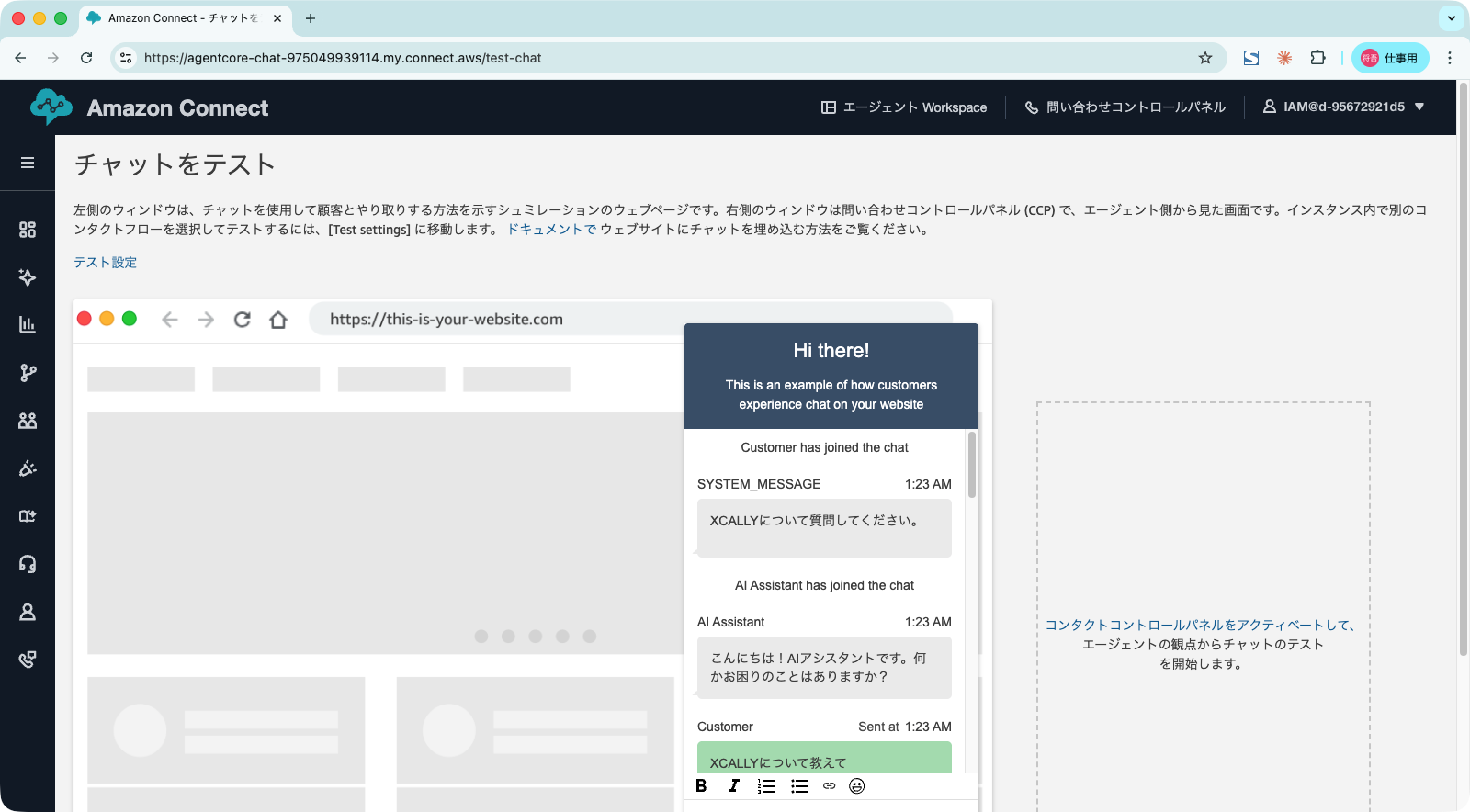
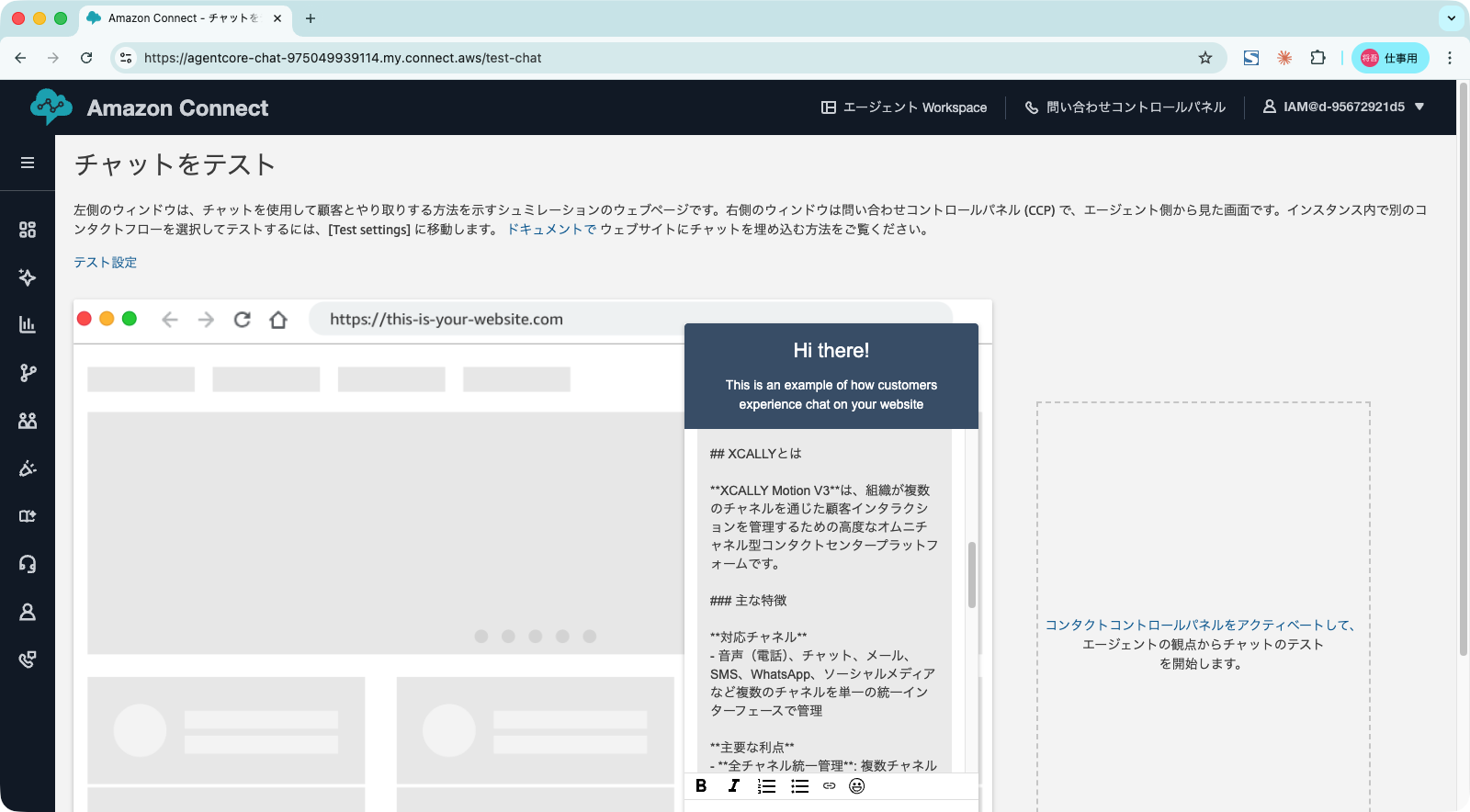
チャット開始時
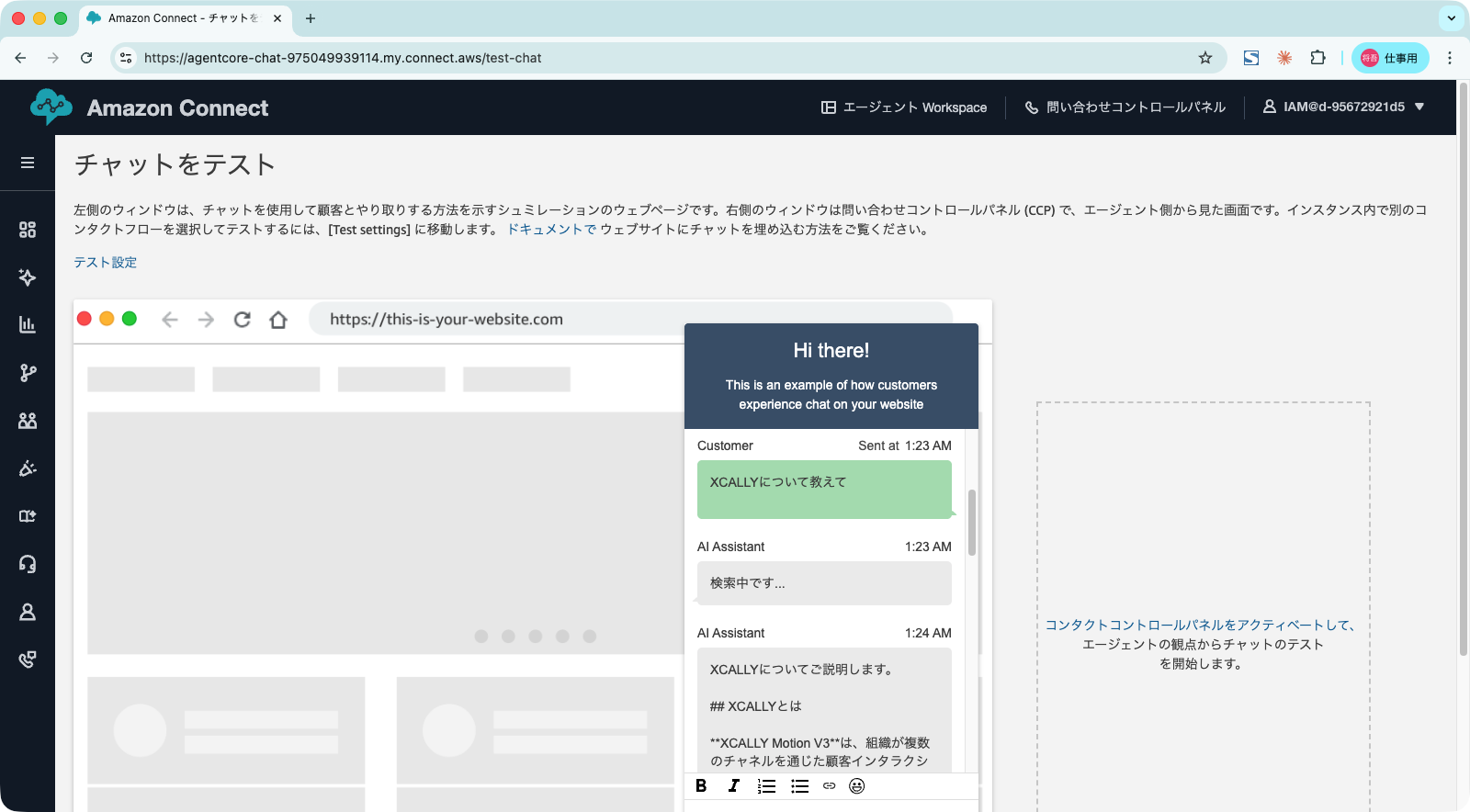
質問に対する回答
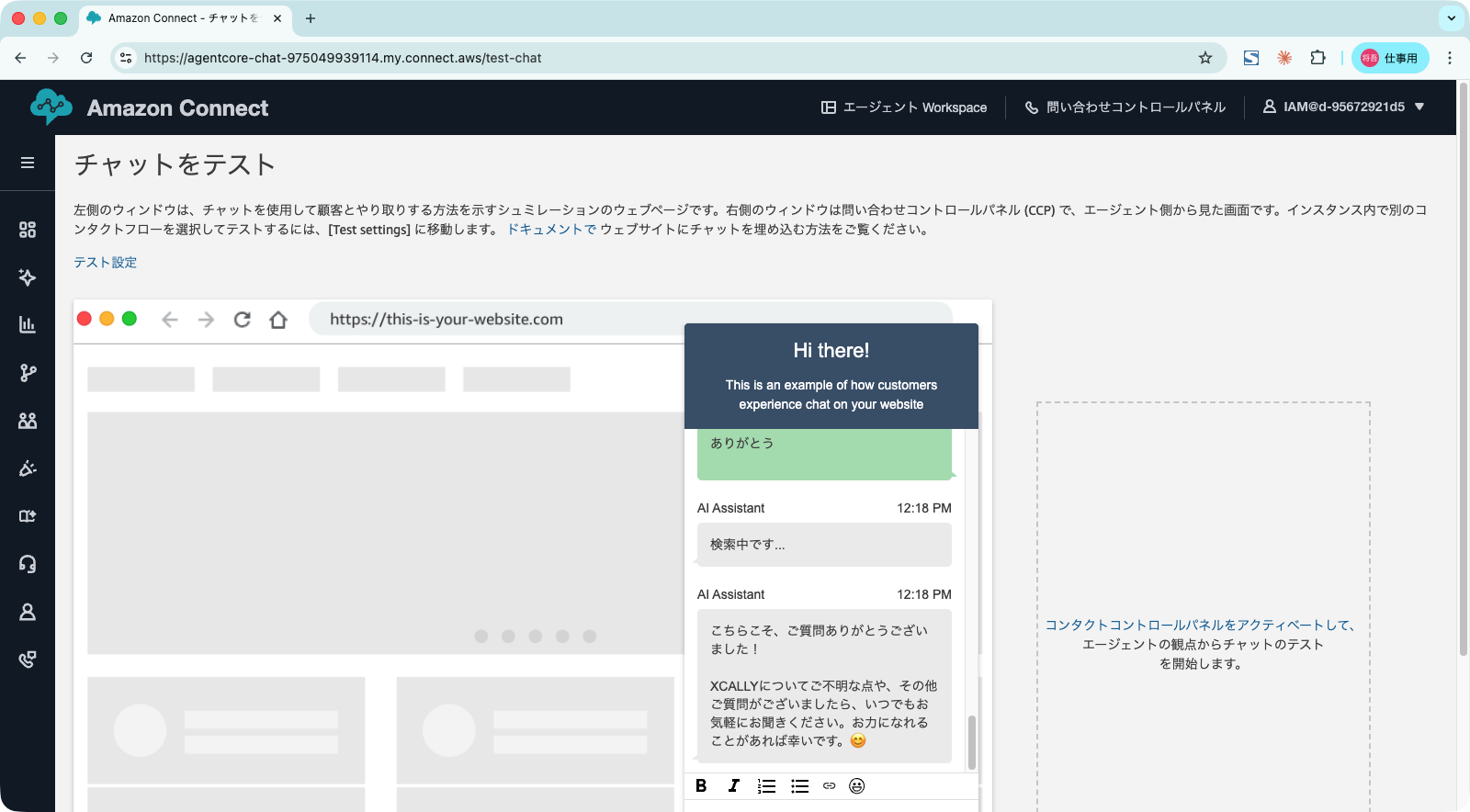
ナレッジベースに関係のないメッセージを送信
アーキテクチャ概要
処理フロー
各処理は以下です。
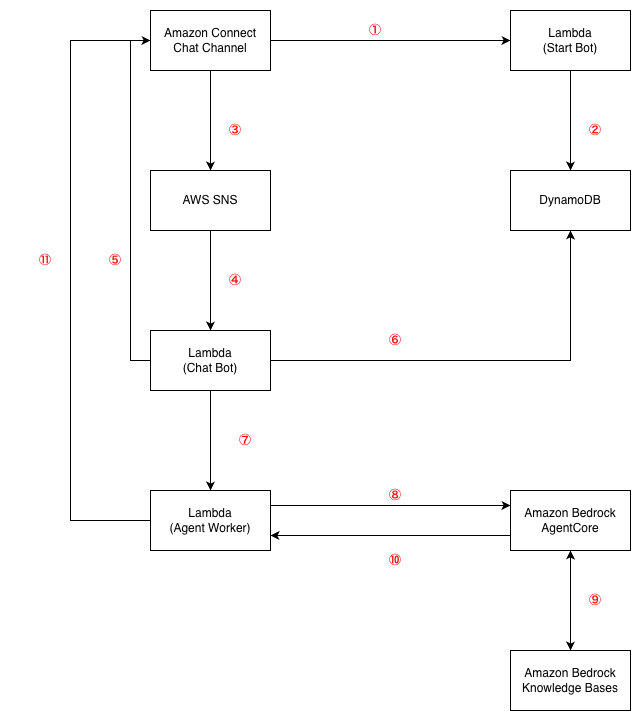
①コールフロー内でLambda「Start Bot」を呼び出す。
② 以下のAPIを呼び出して、DynamoDBにセッションを登録する。この時点でチャットボットが初回メッセージを送信する。
- CreateParticipant API
- StartContactStreaming API
③ ユーザーがメッセージを入力すると、StartContactStreaming APIで指定されているAWS SNSにイベントを送信する。
④ AWS SNSがLambda「Chat Bot」を実行する。
⑤ Lambda「Chat Bot」がチャットに一次応答の「検索中です…」を送信する
⑥ DynamoDBにセッション情報を参照する
⑦ Lambda「Chat Bot」がLambda「Agent Worker」を非同期で呼び出す。
⑧ Lambda「Agent Worker」がAmazon Bedrock AgentCoreにユーザーのメッセージと共にリクエストを送信する。
⑨ Amazon Bedrock AgentCoreがAmazon Bedrock Knowledge BasesにRetrieve(参照)を行い回答を作成する。
⑩ Lambda「Agent Worker」にレスポンスを返す
⑪ Lambda「Agent Worker」がSendMessage APIで回答を送信する。
Amazon Bedrock AgentCore
Strands Agentsを利用して記述しています。
プロンプトをファイルにベタ書きしてますが、本番環境ではAmazon Bedrock Prompt Managementで管理するのがいいですね。
main.py
|
1 2 3 4 5 6 7 8 9 10 11 12 13 14 15 16 17 18 19 20 21 22 23 24 25 26 27 28 29 30 31 32 33 34 35 36 37 38 39 40 41 42 43 44 45 46 47 48 49 50 51 52 53 54 55 56 57 58 59 60 61 62 63 64 65 66 67 68 69 70 71 72 73 74 75 76 77 78 79 80 81 82 83 84 85 86 87 88 89 90 91 92 93 94 95 96 97 98 99 100 101 102 103 104 105 106 107 |
""" AgentCore Runtime エントリポイント このモジュールはAgentCore Runtimeおよびローカル開発環境の両方で動作します。 ## レスポンス構造 invoke関数は以下の構造のdictを返します: { "result": "エージェントの回答テキスト", "stop_reason": "end_turn" # または "max_tokens", "tool_use" など } ## エラーレスポンス エラー発生時は以下の構造: { "error": "エラーメッセージ", "error_type": "ValueError" # エラーの種類 } """ import logging import sys from pathlib import Path from typing import Any # ローカル実行時のパス解決 if __name__ == "__main__" or not __package__: sys.path.insert(0, str(Path(__file__).parent.parent)) from bedrock_agentcore.runtime import BedrockAgentCoreApp try: # デプロイ時(kb_agentパッケージが存在しない場合) from agent import create_kb_agent, invoke_agent except ImportError: # ローカル実行時(kb_agentパッケージとして実行) from kb_agent.agent import create_kb_agent, invoke_agent # ロギング設定 logging.basicConfig( level=logging.INFO, format='%(asctime)s - %(name)s - %(levelname)s - %(message)s' ) logger = logging.getLogger(__name__) # アプリケーション初期化 app = BedrockAgentCoreApp() # エージェントの遅延初期化(初回呼び出し時に生成) _agent = None def get_agent(): """エージェントのシングルトン取得""" global _agent if _agent is None: logger.info("Initializing KB Agent...") _agent = create_kb_agent() logger.info("KB Agent initialized successfully") return _agent @app.entrypoint def invoke(payload: dict[str, Any]) -> dict[str, Any]: """ エージェント呼び出しエントリポイント Args: payload: リクエストペイロード - prompt (str, required): ユーザーの質問 Returns: dict: レスポンス - result (str): エージェントの回答 - stop_reason (str): 停止理由 Example: >>> invoke({"prompt": "製品の特徴を教えてください"}) {"result": "製品の主な特徴は...", "stop_reason": "end_turn"} """ try: user_message = payload.get("prompt", "") if not user_message: return { "error": "prompt is required", "error_type": "ValidationError" } logger.info(f"Processing request: {user_message[:50]}...") agent = get_agent() result = invoke_agent(agent, user_message) logger.info("Request processed successfully") return result except ValueError as e: logger.error(f"Validation error: {e}") return {"error": str(e), "error_type": "ValueError"} except Exception as e: logger.error(f"Unexpected error: {e}", exc_info=True) return {"error": str(e), "error_type": type(e).__name__} if __name__ == "__main__": app.run() |
agent.py
|
1 2 3 4 5 6 7 8 9 10 11 12 13 14 15 16 17 18 19 20 21 22 23 24 25 26 27 28 29 30 31 32 33 34 35 36 37 38 39 40 41 42 43 44 45 46 47 48 49 50 51 52 53 54 55 56 57 58 59 60 61 62 63 64 65 66 67 68 69 70 71 72 73 74 75 76 77 78 79 80 81 82 83 84 85 86 87 88 |
from strands import Agent from strands.models import BedrockModel from strands_tools import retrieve try: # デプロイ時 from config import settings except ImportError: # ローカル実行時 from kb_agent.config import settings # システムプロンプト定義 SYSTEM_PROMPT = """あなたはナレッジベースを活用するQ&Aアシスタントです。 ## 役割 - ユーザーの質問に対して、Knowledge Baseから関連情報を検索し回答します - 正確で簡潔な回答を日本語で提供します ## 回答方針 1. **Knowledge Base優先**: 必ずretrieveツールを使用してKnowledge Baseを検索してください 2. **出典明記**: 回答には情報の出典(ドキュメント名やセクション)を含めてください 3. **不明時の対応**: Knowledge Baseに情報がない場合は「該当する情報が見つかりませんでした」と明示してください 4. **推測の禁止**: Knowledge Baseにない情報を推測で回答しないでください ## 回答フォーマット - 簡潔で分かりやすい日本語で回答 - 必要に応じて箇条書きを使用 - 回答の最後に「出典: [ドキュメント名]」を記載 ## トーン - 丁寧でプロフェッショナル - 技術的な内容も分かりやすく説明 """ def create_kb_agent() -> Agent: """ Knowledge Base Q&Aエージェントを生成する Returns: Agent: 設定済みのStrands Agent Raises: ValueError: 設定が無効な場合 """ # 設定のバリデーション settings.validate() # Bedrockモデルの設定 # 注: Claude Haiku 4.5ではtemperatureとtop_pを同時に指定できない bedrock_model = BedrockModel( model_id=settings.MODEL_ID, region_name=settings.AWS_REGION, temperature=settings.TEMPERATURE, max_tokens=settings.MAX_TOKENS, ) # エージェント生成 agent = Agent( model=bedrock_model, system_prompt=SYSTEM_PROMPT, tools=[retrieve], ) return agent def invoke_agent(agent: Agent, user_message: str) -> dict: """ エージェントを呼び出し、結果を返す Args: agent: Strands Agent user_message: ユーザーからの質問 Returns: dict: レスポンス構造 - result: str - エージェントの回答テキスト - sources: list[str] - 参照した出典リスト(存在する場合) - stop_reason: str - 停止理由 """ response = agent(user_message) return { "result": str(response.message) if hasattr(response, 'message') else str(response), "stop_reason": getattr(response, 'stop_reason', 'end_turn'), } |
config.py
|
1 2 3 4 5 6 7 8 9 10 11 12 13 14 15 16 17 18 19 20 21 22 23 24 25 26 27 28 29 30 31 32 33 34 35 36 37 38 39 40 41 42 43 44 45 46 |
import os from dataclasses import dataclass from dotenv import load_dotenv # .envファイルから環境変数を読み込み load_dotenv() @dataclass class Settings: """エージェント設定を管理するデータクラス""" # Knowledge Base設定 (strands_tools retrieveツールと共通) KNOWLEDGE_BASE_ID: str = os.getenv("KNOWLEDGE_BASE_ID", "") # AWS設定 AWS_REGION: str = os.getenv("AWS_REGION", "ap-northeast-1") # モデル設定 MODEL_ID: str = os.getenv( "BEDROCK_MODEL_ID", "jp.anthropic.claude-haiku-4-5-20251001-v1:0" ) TEMPERATURE: float = float(os.getenv("MODEL_TEMPERATURE", "0.3")) MAX_TOKENS: int = int(os.getenv("MODEL_MAX_TOKENS", "4096")) TOP_P: float = float(os.getenv("MODEL_TOP_P", "0.9")) # 検索設定 KB_MIN_SCORE: float = float(os.getenv("KB_MIN_SCORE", "0.4")) KB_MAX_RESULTS: int = int(os.getenv("KB_MAX_RESULTS", "5")) def validate(self) -> None: """設定値のバリデーション""" if not self.KNOWLEDGE_BASE_ID: raise ValueError("KNOWLEDGE_BASE_ID is required") if not 0.0 <= self.TEMPERATURE <= 1.0: raise ValueError("TEMPERATURE must be between 0.0 and 1.0") if self.MAX_TOKENS < 1: raise ValueError("MAX_TOKENS must be positive") if not 0.0 <= self.TOP_P <= 1.0: raise ValueError("TOP_P must be between 0.0 and 1.0") settings = Settings() |
Amazon Bedrock Knowledge Bases
Amazon S3 Vectorsを利用しています。
Hybrid検索ができないのですが、検証環境であることと今回のデータソースが英語の文章であることから採用しました。
Amazon Bedrock AgentCoreで利用しているStrands AgentsのtoolでRetrieve
Lambda
各Lambdaごとに処理を記載します。
start-bot/handler.py
チャット開始時にカスタムボットを参加させるLambda関数です
CreateParticipant APIを利用してカスタムボット(CUSTOM_BOT)を参加させる
StartContactStreaming APIを利用してSNSトピックへのメッセージ配信を開始する
CreateParticipantConnection<APIを利用してConnectionTokenを取得する
DynamoDBにセッション情報を保存する(TTL付き)
初回メッセージを送信する
|
1 2 3 4 5 6 7 8 9 10 11 12 13 14 15 16 17 18 19 20 21 22 23 24 25 26 27 28 29 30 31 32 33 34 35 36 37 38 39 40 41 42 43 44 45 46 47 48 49 50 51 52 53 54 55 56 57 58 59 60 61 62 63 64 65 66 67 68 69 70 71 72 73 74 75 76 77 78 79 80 81 82 83 84 85 86 |
"""StartBot Lambda: チャット開始時にカスタムボットを参加させる""" import json import boto3 import os import logging from datetime import datetime, timezone, timedelta logger = logging.getLogger() logger.setLevel(logging.INFO) connect_client = boto3.client('connect', region_name='ap-northeast-1') participant_client = boto3.client('connectparticipant', region_name='ap-northeast-1') dynamodb = boto3.resource('dynamodb', region_name='ap-northeast-1') INSTANCE_ID = os.environ['CONNECT_INSTANCE_ID'] SNS_TOPIC_ARN = os.environ['SNS_TOPIC_ARN'] CONTACTS_TABLE = os.environ['CONTACTS_TABLE'] def lambda_handler(event, context): """チャット開始時にボットを参加させる""" logger.info(f"Received event: {json.dumps(event)}") contact_id = event['Details']['ContactData']['ContactId'] try: # 1. カスタムパーティシパント追加 create_response = connect_client.create_participant( InstanceId=INSTANCE_ID, ContactId=contact_id, ParticipantDetails={ 'DisplayName': 'AI Assistant', 'ParticipantRole': 'CUSTOM_BOT' }, ClientToken=f"bot-{contact_id}" ) participant_token = create_response['ParticipantCredentials']['ParticipantToken'] logger.info(f"Created participant for contact: {contact_id}") # 2. メッセージストリーミング開始 connect_client.start_contact_streaming( InstanceId=INSTANCE_ID, ContactId=contact_id, ChatStreamingConfiguration={ 'StreamingEndpointArn': SNS_TOPIC_ARN } ) logger.info(f"Started contact streaming for contact: {contact_id}") # 3. パーティシパント接続(CreateParticipantから15秒以内に呼び出す必要あり) connection_response = participant_client.create_participant_connection( ParticipantToken=participant_token, Type=['CONNECTION_CREDENTIALS'], ConnectParticipant=True ) connection_token = connection_response['ConnectionCredentials']['ConnectionToken'] logger.info(f"Created participant connection for contact: {contact_id}") # 4. セッション情報をDynamoDBに保存 # ConnectionTokenの有効期限は1日、TTLは2日に設定 table = dynamodb.Table(CONTACTS_TABLE) ttl = int((datetime.now(timezone.utc) + timedelta(days=2)).timestamp()) table.put_item(Item={ 'ContactId': contact_id, 'ConnectionToken': connection_token, 'ParticipantToken': participant_token, 'CreatedAt': datetime.now(timezone.utc).isoformat(), 'TokenExpiresAt': connection_response['ConnectionCredentials'].get('Expiry', ''), 'TTL': ttl }) logger.info(f"Saved session to DynamoDB for contact: {contact_id}") # 5. 初回メッセージ送信 participant_client.send_message( ConnectionToken=connection_token, Content='こんにちは!AIアシスタントです。何かお困りのことはありますか?', ContentType='text/plain' ) logger.info(f"Sent initial message for contact: {contact_id}") return {'statusCode': 200, 'body': 'Bot started successfully'} except Exception as e: logger.error(f"Error starting bot for contact {contact_id}: {str(e)}") raise e |
chat-bot/handler.py
SNS経由で受信したメッセージを処理するLambda関数です
SNSイベントの受信してパースを行う
イベントタイプ別の処理(MESSAGE、EVENT、ATTACHMENT)する
一次応答(「検索中です…」)を送信する
AgentWorker Lambdaの非同期呼び出し
チャット終了時のセッションクリーンアップ
|
1 2 3 4 5 6 7 8 9 10 11 12 13 14 15 16 17 18 19 20 21 22 23 24 25 26 27 28 29 30 31 32 33 34 35 36 37 38 39 40 41 42 43 44 45 46 47 48 49 50 51 52 53 54 55 56 57 58 59 60 61 62 63 64 65 66 67 68 69 70 71 72 73 74 75 76 77 78 79 80 81 82 83 84 85 86 87 88 89 90 91 92 93 94 95 96 97 98 99 100 101 102 103 104 105 106 107 108 109 110 111 112 113 114 115 116 117 118 119 120 121 122 123 124 125 126 127 128 129 130 131 132 133 134 135 136 137 138 139 140 141 142 143 144 145 146 147 148 149 150 151 |
"""ChatBot Lambda: SNS経由で受信したメッセージを処理し、一次応答後に非同期でAgentWorkerを呼び出す""" import json import boto3 import os import logging logger = logging.getLogger() logger.setLevel(logging.INFO) lambda_client = boto3.client('lambda', region_name='ap-northeast-1') participant_client = boto3.client('connectparticipant', region_name='ap-northeast-1') dynamodb = boto3.resource('dynamodb', region_name='ap-northeast-1') AGENT_WORKER_LAMBDA = os.environ['AGENT_WORKER_LAMBDA'] CONTACTS_TABLE = os.environ['CONTACTS_TABLE'] def mask_sensitive_content(content: str, max_visible: int = 20) -> str: """ログ出力用にセンシティブな内容をマスキング""" if len(content) <= max_visible: return content return content[:max_visible] + '...[MASKED]' def cleanup_session(contact_id: str): """チャット終了時のセッションクリーンアップ""" try: table = dynamodb.Table(CONTACTS_TABLE) table.delete_item(Key={'ContactId': contact_id}) logger.info(f"Session cleaned up successfully: {contact_id}") except Exception as e: logger.error(f"Failed to cleanup session {contact_id}: {str(e)}") def send_attachment_not_supported_message(message: dict): """添付ファイル非対応の応答を送信""" contact_id = message.get('ContactId') if not contact_id: logger.error("ContactId not found in attachment message") return try: table = dynamodb.Table(CONTACTS_TABLE) item = table.get_item(Key={'ContactId': contact_id}).get('Item') if not item: logger.error(f"Contact not found for attachment handling: {contact_id}") return participant_client.send_message( ConnectionToken=item['ConnectionToken'], Content='申し訳ございません。添付ファイルには対応しておりません。テキストでご質問をお願いいたします。', ContentType='text/plain' ) except Exception as e: logger.error(f"Failed to send attachment not supported message: {str(e)}") def process_customer_message(message: dict): """顧客メッセージを処理: 一次応答送信後、AgentWorker Lambdaを非同期で呼び出す""" contact_id = message['ContactId'] content = message.get('Content', '') logger.info(f"Processing message for contact: {contact_id}, content: {mask_sensitive_content(content)}") table = dynamodb.Table(CONTACTS_TABLE) item = table.get_item(Key={'ContactId': contact_id}).get('Item') if not item: logger.error(f"Contact not found: {contact_id}") return connection_token = item['ConnectionToken'] try: # 1. 一次応答を即座に送信 participant_client.send_message( ConnectionToken=connection_token, Content='検索中です...', ContentType='text/plain' ) logger.info(f"Sent primary response for contact: {contact_id}") # 2. AgentWorker Lambda非同期呼び出し lambda_client.invoke( FunctionName=AGENT_WORKER_LAMBDA, InvocationType='Event', # 非同期 Payload=json.dumps({ 'contact_id': contact_id, 'content': content, 'connection_token': connection_token }) ) logger.info(f"Invoked AgentWorker Lambda asynchronously for contact: {contact_id}") except Exception as e: logger.error(f"Error processing message for contact {contact_id}: {str(e)}") try: participant_client.send_message( ConnectionToken=connection_token, Content='申し訳ございません。エラーが発生しました。しばらくしてから再度お試しください。', ContentType='text/plain' ) except Exception as send_error: logger.error(f"Failed to send error message: {str(send_error)}") def lambda_handler(event, context): """SNS経由で受信したメッセージを処理""" logger.info(f"Received event: {json.dumps(event)}") for record in event['Records']: message = json.loads(record['Sns']['Message']) msg_type = message.get('Type') contact_id = message.get('ContactId', 'unknown') logger.info(f"Processing message type: {msg_type} for contact: {contact_id}") # イベントタイプ別処理 if msg_type == 'EVENT': event_content = message.get('Content', '') if 'ENDED' in event_content: # チャット終了: DynamoDBクリーンアップ cleanup_session(contact_id) continue elif 'LEFT' in event_content: # 参加者離脱: ログ記録 logger.info(f"Participant left: {contact_id}") continue else: logger.info(f"Received event: {event_content} for contact: {contact_id}") continue # 添付ファイル処理 if msg_type == 'ATTACHMENT': send_attachment_not_supported_message(message) continue # 顧客メッセージのみ処理 if message.get('ParticipantRole') != 'CUSTOMER': logger.info(f"Skipping non-customer message from: {message.get('ParticipantRole')}") continue if msg_type != 'MESSAGE': continue # 通常のメッセージ処理 process_customer_message(message) return {'statusCode': 200} |
agent-worker/handler.py
AgentCore Runtimeを呼び出し、生成された応答を顧客に送信するLambda関数です
AgentCore Runtimeの呼び出し
回答を抽出してSendMessage APIを呼び出して顧客に送信する(1024文字を超える場合は分割して送信)
|
1 2 3 4 5 6 7 8 9 10 11 12 13 14 15 16 17 18 19 20 21 22 23 24 25 26 27 28 29 30 31 32 33 34 35 36 37 38 39 40 41 42 43 44 45 46 47 48 49 50 51 52 53 54 55 56 57 58 59 60 61 62 63 64 65 66 67 68 69 70 71 72 73 74 75 76 77 78 79 80 81 82 83 84 85 86 87 88 89 90 91 92 93 94 95 96 97 98 99 100 101 102 103 104 105 106 107 108 109 110 111 112 113 114 115 116 117 118 119 120 121 122 123 124 125 126 127 128 129 130 131 132 133 134 135 136 137 138 139 140 141 142 143 144 145 146 147 148 149 150 151 152 153 154 155 156 157 |
"""AgentWorker Lambda: AgentCoreを呼び出し、本応答を送信""" import json import ast import boto3 import os import logging logger = logging.getLogger() logger.setLevel(logging.INFO) agentcore_client = boto3.client('bedrock-agentcore', region_name='ap-northeast-1') participant_client = boto3.client('connectparticipant', region_name='ap-northeast-1') AGENT_RUNTIME_ARN = os.environ['AGENT_RUNTIME_ARN'] # Amazon Connect Chatのメッセージサイズ上限: text/plainは1024文字 MAX_MESSAGE_LENGTH = 1024 def extract_text_from_response(raw_response: str) -> str: """AgentCoreのレスポンスから実際のテキストを抽出する AgentCoreのレスポンス形式: {"result": "{'role': 'assistant', 'content': [{'text': '実際のメッセージ'}]}", "stop_reason": "end_turn"} """ try: # まずJSON形式でパース outer = json.loads(raw_response) # resultフィールドがあればそこから抽出 if "result" in outer: result_str = outer["result"] # resultがPython辞書の文字列表現の場合(シングルクォート) try: inner = ast.literal_eval(result_str) except (ValueError, SyntaxError): # JSON形式の場合 inner = json.loads(result_str) # contentからtextを抽出 if "content" in inner and isinstance(inner["content"], list): texts = [] for item in inner["content"]: if isinstance(item, dict) and "text" in item: texts.append(item["text"]) if texts: return "\n".join(texts) # フォールバック: そのまま返す return raw_response except (json.JSONDecodeError, KeyError, TypeError) as e: logger.warning(f"Failed to parse AgentCore response: {e}") return raw_response def send_chunked_message(connection_token: str, content: str): """1024文字を超えるメッセージを分割送信する Amazon Connect Chatのtext/plainメッセージは最大1024文字の制限があるため、 長いメッセージは分割して送信する必要がある。 """ if len(content) <= MAX_MESSAGE_LENGTH: participant_client.send_message( ConnectionToken=connection_token, Content=content, ContentType='text/plain' ) return # メッセージを分割 chunks = [] remaining = content while remaining: if len(remaining) split_pos: split_pos = pos if split_pos == -1 or split_pos 1: prefix = f"({i+1}/{len(chunks)}) " # prefixを含めても1024文字を超えないよう調整 max_chunk_len = MAX_MESSAGE_LENGTH - len(prefix) chunk = prefix + chunk[:max_chunk_len] participant_client.send_message( ConnectionToken=connection_token, Content=chunk, ContentType='text/plain' ) logger.info(f"Sent chunk {i+1}/{len(chunks)}") def lambda_handler(event, context): """AgentCoreを呼び出し、本応答を送信""" logger.info(f"Received event: {json.dumps(event)}") contact_id = event['contact_id'] content = event['content'] connection_token = event['connection_token'] try: # AgentCore呼び出し logger.info(f"Invoking AgentCore for contact: {contact_id}") payload = {"prompt": content} response = agentcore_client.invoke_agent_runtime( agentRuntimeArn=AGENT_RUNTIME_ARN, runtimeSessionId=contact_id, payload=json.dumps(payload).encode('utf-8') ) # ストリーミングレスポンス処理 content_type = response.get("contentType", "") logger.info(f"Response content type: {content_type}") # まずバイト列を全て読み込んでからデコード(マルチバイト文字の分断を防ぐ) raw_bytes = b"" if "text/event-stream" in content_type: # Server-Sent Events形式 for chunk in response["response"].iter_chunks(): if chunk: raw_bytes += chunk # デコード後にSSE形式をパース raw_text = raw_bytes.decode("utf-8") agent_response = "" for line in raw_text.split("\n"): if line.startswith("data: "): agent_response += line[6:] else: # 通常のストリーミングレスポンス for chunk in response.get("response", []): if isinstance(chunk, bytes): raw_bytes += chunk else: raw_bytes += str(chunk).encode('utf-8') agent_response = raw_bytes.decode('utf-8') logger.info(f"AgentCore raw response: {agent_response[:500]}...") # レスポンスから実際のテキストを抽出 agent_response = extract_text_from_response(agent_response) logger.info(f"AgentCore extracted response length: {len(agent_response)} for contact: {contact_id}") if not agent_response: agent_response = "申し訳ございません。回答を生成できませんでした。もう一度お試しください。" # 本応答送信(1024文字超の場合は分割送信) send_chunked_message(connection_token, agent_response) logger.info(f"Sent final response for contact: {contact_id}") except Exception as e: logger.error(f"Error invoking AgentCore for contact {contact_id}: {str(e)}") try: participant_client.send_message( ConnectionToken=connection_token, Content='申し訳ございません。エラーが発生しました。しばらくしてから再度お試しください。', ContentType='text/plain' ) except Exception as send_error: logger.error(f"Failed to send error message: {str(send_error)}") return {'statusCode': 200} |
まとめ
コードは生成AIで作ってとりあえず動くものと言う感じなんで、本番では諸々修正が必要ですが、実装のベースは出来たと思います。
今回触って何よりおもしろかったのが、Amazon Bedrock AgentCore、Strands AgentsとS3 Vectorsですね。
Amazon Bedrock AgentCoreとStrands Agentsの組み合わせで、この記事に限らず触ってみてますが、こんな簡単でこんなにいい感じに動くんだっていう感動がありますね。
S3 VectorsもOpensearch Serverlessに比べたら圧倒的なコストメリットある点が魅力でした。
Amazon Connectのアドベントカレンダーなのに、締めが他のサービスのこと中心になっちゃいました。
参考にしたドキュメント
- Custom Participants with Connect Chat サンプル
- Amazon Connect Chat Admin Guide
- Bedrock AgentCore Developer Guide
- InvokeAgentRuntime API Reference
- CreateParticipant API Reference

- Amazon Connect + Amazon Bedrock AgentCoreでチャットボットを構築する - 2025-12-10
- 【Kiro・Playwright】社内でフルAI開発バトル!!「1行も書かずに」Todoアプリを完成させた話〜araoの場合〜 - 2025-12-09
- [Amazon Connect]東京リージョンで電話番号取得に時間がかかる理由を調べてみた – Amazon Connect アドベントカレンダー 2024 - 2024-12-22
- sbt-awsを利用してAWS MarketplaceにSaaSを出品する - 2024-12-11
- Macで利用しているお気に入りアプリ8選 - 2024-12-05

【採用情報】一緒に働く仲間を募集しています