こんにちは。エンジニアのhagaです。
このブログはギークフィードアドベントカレンダー2025の6日目の記事です。
他の記事もぜひチェックしてみてください!
目次
自己紹介
クラウド開発事業部所属のhagaです。
エンジニア歴は5年で、主にAWSを使った開発をしています。最近はGenesys Cloudもやっています。
普段使ってるAIツール
日常的に以下のAIツールを活用しています。
- Cursor:開発全般の補助やコード解析
企画概要とゴール
今回、「フルAI開発バトル」という企画に参加しました。
ルールはシンプルかつ過酷です。
|
1 2 3 4 5 6 7 8 9 10 11 12 13 14 15 16 17 |
# 禁止事項:エディタで直接コードを書く・修正すること - 許されるのは「AIへの指示」のみ。人間の役割は「Architect/Reviewer」、つまりAIをマネジメントして成果物を判断することです。 # お題 社員の生産性を上げる日々の業務管理ツールを作ってください。 ## 必須要件: - KiroとPlaywright MCPを使うこと - スペック駆動開発を行うこと(vibe codingはNG) - Todoを追加・編集・削除できること - 追加は画面上部のフォームから可能 - 編集・削除は各行の操作ボタンで行う - 一覧でTodoを確認できること - 一覧にはタイトル、担当者、期限を表示 - サクサク軽く操作できること - 画面は1ページで完結 - PlaywrightでCRUD周りのテストをすること |
詳しいルールや目的はアドベントカレンダー1日目の記事で紹介しております。
作業プロセス
要件の理解と整理
運営への質問事項
Specs定義
指示に至るまでの思考プロセス
Kiroへの指示
|
1 2 3 4 5 6 7 8 9 10 11 12 13 14 15 16 17 |
会社の企画で、社員の生産性を上げる日々の業務管理ツールを作ることになりました。 かけられる時間は2時間ほどです。以下に要件を提示します。 必須要件: - KiroとPlaywright MCPを使うこと - スペック駆動開発を行うこと(vibe codingはNG) - Todoを追加・編集・削除できること - 追加は画面上部のフォームから可能 - 編集・削除は各行の操作ボタンで行う - 一覧でTodoを確認できること - 一覧にはタイトル、担当者、期限を表示 - ログイン機能は不要 - サクサク軽く操作できること - 画面は1ページで完結 - ブラウザを閉じてもデータが消えない - PlaywrightでCRUD周りのテストをすること - AWS上にデプロイする必要がある |
Kiroの出力
requirements.md
|
1 2 3 4 5 6 7 8 9 10 11 12 13 14 15 16 17 18 19 20 21 22 23 24 25 26 27 28 29 30 31 32 33 34 35 36 37 38 39 40 41 42 43 44 45 46 47 48 49 50 51 52 53 54 55 56 57 58 59 60 61 62 63 64 65 66 67 68 69 70 71 72 73 74 75 76 77 78 79 80 81 82 83 84 85 86 87 88 89 90 91 92 93 94 95 96 |
# Requirements Document ## Introduction 社員の生産性向上を目的とした日々の業務管理ツール。シンプルで軽快な操作性を重視し、Todo管理機能を中心とした1ページ完結型のWebアプリケーション。 ## Glossary - **Task Management System**: 本業務管理ツールシステム - **Todo**: 実行すべき作業項目(タイトル、担当者、期限を含む) - **User**: システムを利用する社員 - **Local Storage**: ブラウザのローカルストレージ機能 - **CRUD Operations**: Create(作成)、Read(読み取り)、Update(更新)、Delete(削除)操作 - **SPA**: Single Page Application(1ページ完結型アプリケーション) ## Requirements ### Requirement 1 **User Story:** As a user, I want to add new todos to my task list, so that I can capture and organize work items I need to accomplish. #### Acceptance Criteria 1. WHEN a user enters todo information in the top form and submits it, THE Task Management System SHALL create a new todo with title, assignee, and deadline 2. WHEN a user attempts to add a todo with empty required fields, THE Task Management System SHALL prevent the addition and display validation feedback 3. WHEN a new todo is added, THE Task Management System SHALL clear the input form and display the updated todo list 4. WHEN a todo is added, THE Task Management System SHALL persist the todo to local storage immediately 5. WHEN the form receives focus, THE Task Management System SHALL provide clear visual feedback for input fields ### Requirement 2 **User Story:** As a user, I want to edit existing todos, so that I can update task information when requirements change. #### Acceptance Criteria 1. WHEN a user clicks the edit button for a todo, THE Task Management System SHALL display an editable form with current todo information 2. WHEN a user saves edited todo information, THE Task Management System SHALL update the todo and persist changes to local storage 3. WHEN a user cancels editing, THE Task Management System SHALL restore the original todo display without saving changes 4. WHEN editing is in progress, THE Task Management System SHALL disable other edit operations to prevent conflicts ### Requirement 3 **User Story:** As a user, I want to delete todos that are no longer needed, so that I can keep my task list clean and relevant. #### Acceptance Criteria 1. WHEN a user clicks the delete button for a todo, THE Task Management System SHALL remove the todo from the list immediately 2. WHEN a todo is deleted, THE Task Management System SHALL update local storage to reflect the removal 3. WHEN a todo is deleted, THE Task Management System SHALL maintain the display order of remaining todos 4. WHEN the last todo is deleted, THE Task Management System SHALL display an appropriate empty state message ### Requirement 4 **User Story:** As a user, I want to view all my todos in a list format, so that I can see all my tasks at a glance. #### Acceptance Criteria 1. WHEN the application loads, THE Task Management System SHALL display all stored todos in a list format 2. WHEN displaying todos, THE Task Management System SHALL show title, assignee, and deadline for each todo 3. WHEN the todo list is empty, THE Task Management System SHALL display a helpful message indicating no todos exist 4. WHEN todos are displayed, THE Task Management System SHALL provide edit and delete buttons for each todo item 5. WHEN the page is refreshed, THE Task Management System SHALL load and display all previously saved todos from local storage ### Requirement 5 **User Story:** As a user, I want the application to be fast and responsive, so that I can manage my tasks efficiently without delays. #### Acceptance Criteria 1. WHEN performing any CRUD operation, THE Task Management System SHALL complete the operation within 100 milliseconds 2. WHEN the application loads, THE Task Management System SHALL display the interface within 500 milliseconds 3. WHEN switching between different operations, THE Task Management System SHALL provide immediate visual feedback 4. WHEN data is persisted to local storage, THE Task Management System SHALL complete the operation synchronously ### Requirement 6 **User Story:** As a user, I want my todo data to persist across browser sessions, so that I don't lose my work when closing the browser. #### Acceptance Criteria 1. WHEN a user closes and reopens the browser, THE Task Management System SHALL restore all previously saved todos 2. WHEN data is modified, THE Task Management System SHALL immediately save changes to local storage 3. WHEN local storage data is corrupted or invalid, THE Task Management System SHALL handle the error gracefully and start with an empty state 4. WHEN the application starts, THE Task Management System SHALL validate local storage data before displaying todos ### Requirement 7 **User Story:** As a developer, I want comprehensive automated tests for CRUD operations, so that I can ensure the application works correctly across different scenarios. #### Acceptance Criteria 1. WHEN running automated tests, THE Task Management System SHALL pass all Playwright tests for todo creation functionality 2. WHEN running automated tests, THE Task Management System SHALL pass all Playwright tests for todo editing functionality 3. WHEN running automated tests, THE Task Management System SHALL pass all Playwright tests for todo deletion functionality 4. WHEN running automated tests, THE Task Management System SHALL pass all Playwright tests for todo display and persistence functionality 5. WHEN running automated tests, THE Task Management System SHALL validate that all CRUD operations work correctly in a browser environment |
design.md
|
1 2 3 4 5 6 7 8 9 10 11 12 13 14 15 16 17 18 19 20 21 22 23 24 25 26 27 28 29 30 31 32 33 34 35 36 37 38 39 40 41 42 43 44 45 46 47 48 49 50 51 52 53 54 55 56 57 58 59 60 61 62 63 64 65 66 67 68 69 70 71 72 73 74 75 76 77 78 79 80 81 82 83 84 85 86 87 88 89 90 91 92 93 94 95 96 97 98 99 100 101 102 103 104 105 106 |
# Design Document ## Overview Task Management Systemは、社員の生産性向上を目的とした軽量なSingle Page Application(SPA)です。バニラJavaScriptを使用してシンプルで高速な動作を実現し、LocalStorageによるデータ永続化とPlaywrightによる包括的なテストを提供します。 ## Architecture ### Technology Stack - **Frontend**: HTML5, CSS3, Vanilla JavaScript (ES6+) - **Data Storage**: Browser LocalStorage API - **Testing**: Playwright for E2E testing - **Build**: Minimal build process for rapid development ## Core Components - **TodoManager**: CRUD operations and business logic - **StorageService**: LocalStorage operations abstraction - **UIController**: DOM manipulation and event handling - **ValidationService**: Input data validation ## Data Models - **Todo**: id, title, assignee, deadline, createdAt, updatedAt - **ValidationResult**: isValid, errors - **Application State**: todos, editingTodoId, isLoading, error ## C orrectness Properties *A property is a characteristic or behavior that should hold true across all valid executions of a system-essentially, a formal statement about what the system should do. Properties serve as the bridge between human-readable specifications and machine-verifiable correctness guarantees.* ### Property 1: CRUD Operations with Persistence *For any* valid todo data and any CRUD operation (create, update, delete), the operation should complete successfully and immediately persist the change to local storage, with the UI reflecting the updated state. **Validates: Requirements 1.1, 1.4, 2.2, 3.1, 3.2, 6.2** ### Property 2: Input Validation Consistency *For any* invalid todo input (empty required fields, invalid formats), the system should reject the input, display specific error messages, and maintain the current application state unchanged. **Validates: Requirements 1.2, 10.1, 10.4** ### Property 3: UI State Management *For any* UI operation (add, edit, cancel, delete), the system should maintain consistent state by clearing forms after successful operations, disabling conflicting actions during editing, and preserving context appropriately. **Validates: Requirements 1.3, 2.1, 2.3, 2.4, 9.3** ### Property 4: Data Display Completeness *For any* todo in the system, when displayed in the list, all required fields (title, assignee, deadline) and action buttons (edit, delete) should be visible and functional. **Validates: Requirements 4.2, 4.4** ### Property 5: Persistence Round-Trip *For any* application state containing todos, storing the state and then reloading the application should restore exactly the same todos with all their properties intact. **Validates: Requirements 4.1, 4.5, 6.1** ### Property 6: Performance Constraints *For any* CRUD operation, the operation should complete within 100 milliseconds and storage operations should execute synchronously without introducing delays. **Validates: Requirements 5.1, 5.4** ### Property 7: Error Recovery *For any* corrupted or invalid data in local storage, the system should detect the issue, handle it gracefully, start with a clean state, and inform the user appropriately. **Validates: Requirements 6.3, 6.4, 10.2, 10.5** ### Property 8: Single Page Application Behavior *For any* user interaction or operation, the system should complete the action without page reloads, redirects, or navigation, maintaining the single-page application architecture. **Validates: Requirements 9.2** ### Property 9: Order Preservation *For any* list of todos, when one todo is deleted, the relative order of all remaining todos should be preserved exactly as it was before the deletion. **Validates: Requirements 3.3** ## Error Handling - **Validation Errors**: Field-specific error messages and highlighting - **Storage Errors**: Handling quota exceeded, access denied, data corruption - **System Errors**: Error logging and user notification for unexpected errors ## Testing Strategy ### End-to-End Testing with Playwright - **Tool**: Playwright for comprehensive browser testing - **Scope**: Complete CRUD workflows, data persistence, UI interactions - **Coverage**: Todo creation, editing, deletion, validation, error handling - **Browsers**: Chrome, Firefox, Safari, Mobile devices ## File Structure ``` ├── index.html ├── styles/main.css ├── js/ │ ├── main.js │ ├── models/todo.js │ ├── services/ │ │ ├── storage-service.js │ │ ├── validation-service.js │ │ └── todo-manager.js │ ├── ui/ui-controller.js │ └── utils/ │ ├── performance-monitor.js │ └── loading-manager.js └── tests/ ├── e2e/ (Playwright tests) └── helpers/test-helpers.js ``` This design provides a solid foundation for implementing a simple and maintainable Task Management System that meets all requirements. |
tasks.md
|
1 2 3 4 5 6 7 8 9 10 11 12 13 14 15 16 17 18 19 20 21 22 23 24 25 26 27 28 29 30 31 32 33 34 35 36 37 38 39 40 41 42 43 44 45 46 47 48 49 50 51 52 53 54 55 56 57 58 59 |
# Implementation Plan - 要件準拠簡略版 - [x] 1. 基本構造の設定 - HTML構造(フォームとTodoリスト)の作成 - 基本的なCSSスタイルの設定 - JavaScript ES6モジュール構造の初期化 - _Requirements: 1.1, 4.1, 4.2_ - [x] 2. Todoデータモデルとバリデーション - Todo クラス(id, title, assignee, deadline)の作成 - 必須フィールドバリデーション機能の実装 - バリデーションエラー表示機能 - _Requirements: 1.1, 1.2, 1.5_ - [x] 3. ローカルストレージ機能 - LocalStorage操作(保存、読み込み、削除)の実装 - データ破損検出と復旧処理 - ページリフレッシュ後のデータ復元 - _Requirements: 6.1, 6.2, 6.3, 6.4, 4.5_ - [x] 4. TodoManager ビジネスロジック - addTodo, updateTodo, deleteTodo, getAllTodos メソッドの実装 - バリデーションとストレージの統合 - 即座のローカルストレージ保存 - _Requirements: 1.1, 1.4, 2.2, 3.1, 3.2, 4.1_ - [x] 5. ユーザーインターフェース - [x] 5.1 基本UI機能 - フォーム処理とTodoリスト表示 - 追加・編集・削除ボタンの実装 - フォームクリア機能 - _Requirements: 1.1, 1.3, 2.1, 3.1, 4.2, 4.4_ - [x] 5.2 編集機能 - インライン編集の実装 - 保存・キャンセル機能 - 編集中の他操作無効化 - _Requirements: 2.1, 2.2, 2.3, 2.4_ - [x] 6. パフォーマンスと空状態処理 - CRUD操作の100ms以内実行 - 初期ロード500ms以内 - 空状態メッセージ表示 - 順序保持機能 - _Requirements: 3.3, 3.4, 4.3, 5.1, 5.2, 5.3, 5.4_ - [x] 7. Playwright自動テスト - [x] 7.1 テスト環境設定 - Playwrightインストールと設定 - _Requirements: 7.1, 7.2, 7.3, 7.4, 7.5_ - [x] 7.2 CRUD操作テスト - Todo作成、編集、削除、表示のテスト - データ永続化テスト - _Requirements: 7.1, 7.2, 7.3, 7.4, 7.5_ - [x] 8. 最終動作確認 - 全要件の動作テスト - ブラウザでの最終確認 |
出力の判定と修正
判定結果
修正必要。
task.mdの工程がかなり複雑に多層化していた。
良かった点
問題点
何も考えずボタンを押してるだけで勝手に進んでできてしまうので、人の目で正しくレビューを行うのが逆に難しいと感じた。さくさく進みすぎて色々見落としそう。
Kiroとの対話
- 時間をかけたくないので、specsの内容を簡略化してください
- 簡略化したものが最初に提示した要件とずれていないか再度確認してください
- 追加の要件です。タスクを完了させる機能と、間違って完了させたときに元に戻す機能が必要です。
→task.mdはかなり簡略化され、その際にできた要件とのずれも修復された。所要時間の大幅削減ができた。
追加の要件もプロンプト一つでまるっと実装できた。
テスト実装
- Todo作成機能テスト
- 有効なデータでのTodo作成
- 複数Todoの連続作成
- バリデーションエラーの検証(必須フィールド、文字数制限)
- 空白のみのタイトル検証
- 重複チェック
- フォーカス時の視覚的フィードバック
- キーボードショートカット(Ctrl+Enter)
- LocalStorageへの即座の保存確認
- パフォーマンス測定(100ms以内)
- Todo編集機能テスト
- 編集フォームの表示
- Todoの更新と保存
- 編集のキャンセル
- 編集中の他Todo操作制限
- キーボードショートカット(Escキー)
- 未保存変更の確認ダイアログ
- 編集時のバリデーション
- ページリロード後のデータ保持
- パフォーマンス測定
- Todo削除機能テスト
- 削除ボタンでのTodo削除
- 削除確認ダイアログ(承認/キャンセル)
- 複数Todo中の特定Todo削除
- 削除後の表示順序保持
- 最後のTodo削除時の空状態表示
- 編集中Todoの削除制限
- ページリロード後の反映確認
- 同期的な削除処理
- 大量データでの削除動作
- パフォーマンス測定
- データ永続化機能テスト
- アプリ起動時の保存データ復元
- ブラウザ再起動後のデータ保持
- データ変更の即座の保存
- 破損データの処理
- LocalStorageデータの検証
- 大量データ(50件)の永続化
- データ整合性の確認(UUID、タイムスタンプ)
- LocalStorage容量制限の処理
- 複数タブでのデータ同期
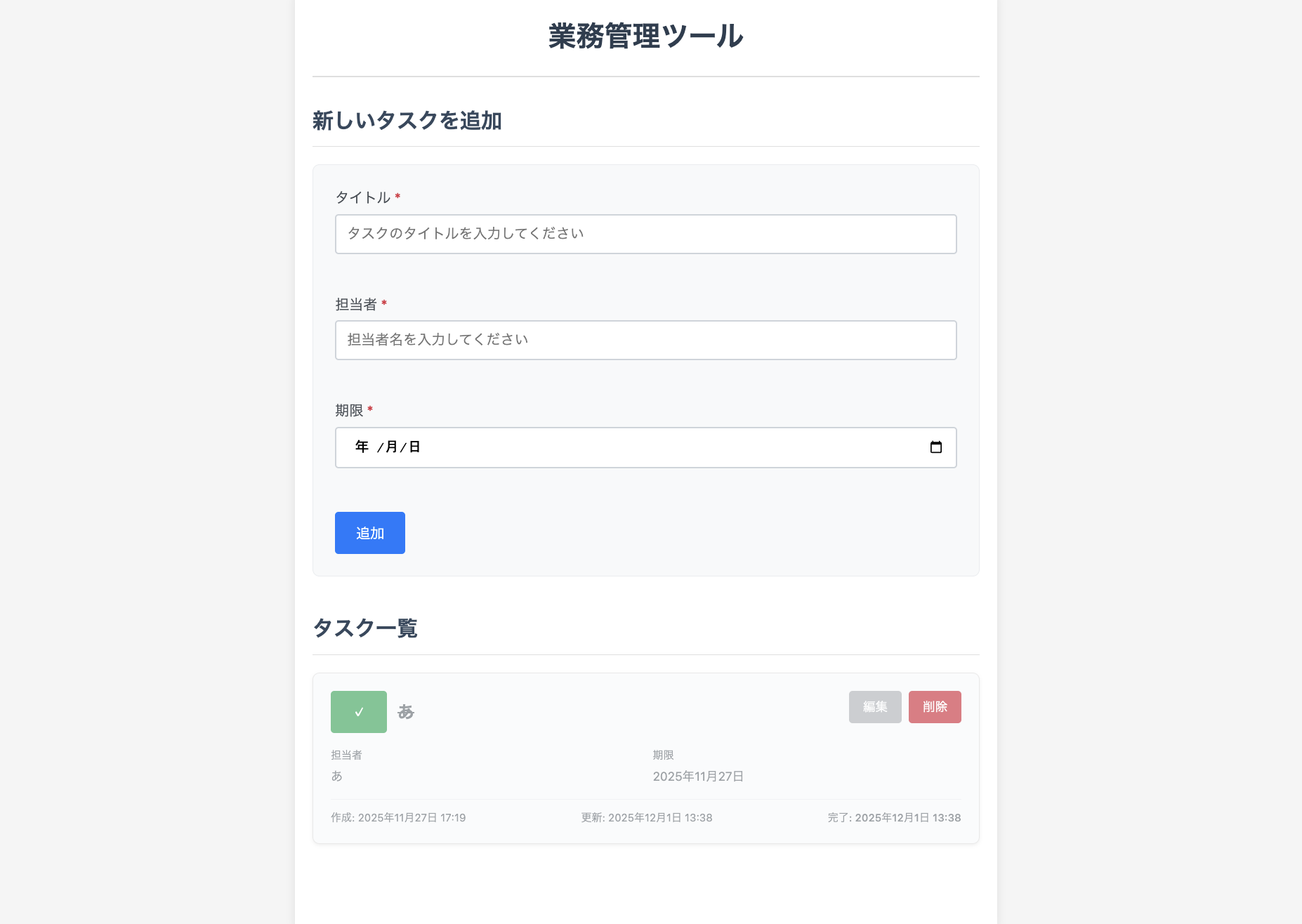
成果物
所要時間
3時間
主な機能
要件のとおり
工夫点など
多機能化するというよりは、要件最小限の機能をなるべく手間をかけずに実装することを意識しました。
発見と学び
作業効率化の面ではとんでもない進歩だと思う。
ただし、便利な反面何も考えなくてもある程度のものができてしまうので、生成AIが何をやっているのかをちゃんと理解しながらレビューする能力が重要だと感じた。
感想
今まではあくまで補助的な認識で生成AIを使っていましたが、むしろ人間が補助的な役割になるというのが新鮮な体験でした。企画していただいたメンバーに感謝です。
良かった点
生成AIの可能性を体験できた。
苦労した点
ボタンを押すだけでどんどん工程が進んでいくので、内容を理解しながら置いて行かれないように進めるのは思ったより大変だと感じた。
今後に活かせること
テスト周りは人がやるより漏れも少なく、人の目で確認すべき範囲もそこまで多くないと感じたので、どんどん生成AIを取り入れていきたいと思う。
この記事が、少しでもみなさんのにお役に立てば幸いです。
ここまでお読みいただき、ありがとうございました!

- 【Kiro・Playwright】社内でフルAI開発バトル!!「1行も書かずに」Todoアプリを完成させた話〜hagaの場合〜 - 2025-12-06
- AWS Lambda コンソールの組み込みコードエディタを利用する際の注意点 - 2022-04-18
- Twilio + Google SpreadSheet で忘年会に使える抽選アプリを作ってみた【後編】 - 2020-12-25
- QNAPからLinuxへ rsyncでバックアップをとろう - 2020-10-20

【採用情報】一緒に働く仲間を募集しています